Pantacor Hub has an MCP endpoint now:
https://api.pantahub.com/mcp
Add it to Claude, ChatGPT, Codex or OpenCode and you can ask about your devices (status, revisions, logs), change user-meta, and deploy new revisions. It signs in with your Hub account over OAuth. It starts read-only and asks you again the first time it needs write access. Your client asks you before every change.
Full docs: The MCP connector | Pantacor Hub Docs
claude.ai
-
Customize > Connectors > Add > Add custom connector. Name it
pantahuband paste the URL. -
Click Connect and sign in to Hub.
-
Open the connector to set its tool permissions. Read-only tools default to Always allow and write/delete tools to Needs approval. Change them if you want.
-
To let Claude upload
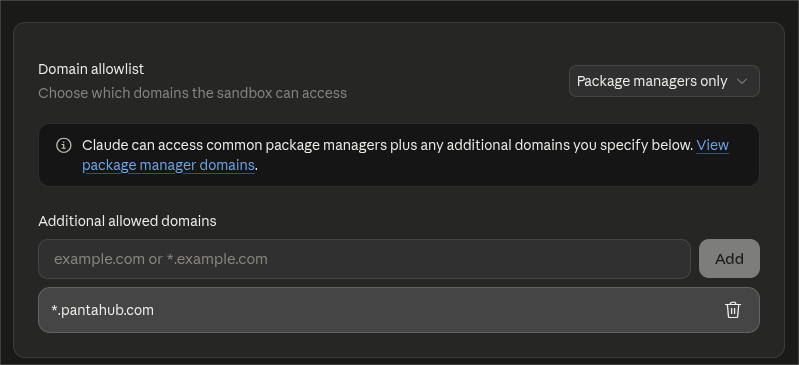
pvrexports to Hub, go to Settings > Capabilities and under the code execution Domain allowlist add*.pantahub.comto Additional allowed domains:
Claude Code
claude mcp add --transport http --scope user pantahub https://api.pantahub.com/mcp
Then /mcp > pantahub > Authenticate.
Codex
codex mcp add pantahub --url https://api.pantahub.com/mcp
It opens the browser to sign in. Use codex mcp login pantahub to sign in again later.
OpenCode
In ~/.config/opencode/opencode.json:
{
  "mcp": {
    "pantahub": {
      "type": "remote",
      "url": "https://api.pantahub.com/mcp"
    }
  }
}
Then opencode mcp auth pantahub.
ChatGPT
Same tools as in Claude, reads and writes, and ChatGPT asks you to confirm each write. It needs Developer mode, which is web only, on Plus, Pro, Business, Enterprise and Edu plans. Turn it on in Settings > Security and login > Developer mode. Then create an app with the URL and OAuth as authentication, and enable it in a chat from the Developer mode tool. See OpenAI’s guide if the menus have moved.
Feedback welcome here.