Pantavisor can now be built with PTXdist:
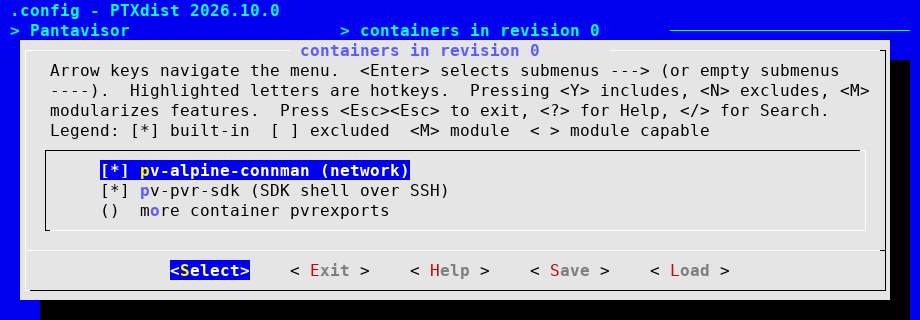
It’s a PTXdist layer on top of DistroKit, the Pengutronix reference BSP. DistroKit stays unmodified; the layer adds Pantavisor and its packages (lxc, libthttp, mbedtls, …) and image types that produce what you know from the Yocto layer: a bootable SD card / eMMC image, a signed BSP (.pvrexport.tgz) and factory revision 0 with pv-alpine-connman (network) and pv-pvr-sdk.
This is a work in progress. It builds and boots, but expect rough edges and changes. Any feedback is greatly appreciated: what you tried, what broke, which boards you’d like to see.
Devices
| Device | pv-build.sh name |
Platform |
|---|---|---|
| Orange Pi 5 | orangepi5 |
v8a |
| Orange Pi 5B | orangepi5b |
v8a |
| Raspberry Pi 3B+ | rpi3 |
v8a |
| Raspberry Pi 4 | rpi4 |
v8a |
| QEMU arm64 | qemu-arm64 |
v8a |
| QEMU x86_64 | qemu-x86_64 |
x86_64 |
All of them build. Both QEMU targets boot to Pantavisor with the containers and network up.
Prebuilt images
You don’t have to build anything to try it. The first release already has prebuilt images:
| Device | Download |
|---|---|
| Orange Pi 5B | pv-orangepi5b.img.xz |
| Raspberry Pi 4 | pv-rpi4.img.xz |
| QEMU x86_64 | pv-qemu-x86_64.img.xz + u-boot-qemu-x86_64.rom |
Each comes with its signed BSP and SHA256SUMS. The release notes have the command to boot the QEMU image, and how to write a board image to an SD card:
xz -dc pv-orangepi5b.img.xz | sudo dd of=/dev/sdX bs=4M conv=fsync status=progress
New releases will show up at Releases · pantavisor/pv-ptxdist · GitHub.
Build an image
You need Linux with Docker. The build runs in a container with PTXdist 2026.10.0 and OSELAS.Toolchain 2025.11.1.
git clone --recursive https://github.com/pantavisor/pv-ptxdist.git
cd pv-ptxdist
scripts/pv-docker.sh --pull        # once: download the container
scripts/pv-build.sh orangepi5b     # or any device from the table
The build container is public on Docker Hub: ferlzc/pv-ptxdist-builder - Docker Image. To build it yourself instead, run scripts/pv-docker.sh --build.
pv-build.sh selects the device’s platform, toolchain and board, then builds only that image and what it needs. The result is in platform-<platform>/images/, e.g. platform-v8a/images/pv-orangepi5b.img and pantavisor-bsp-orangepi5b.pvrexport.tgz. scripts/pv-build.sh --list lists the devices.
Write it to an SD card:
sudo dd if=platform-v8a/images/pv-orangepi5b.img of=/dev/sdX bs=4M conv=fsync status=progress
Or build a QEMU target and boot it:
scripts/pv-build.sh qemu-x86_64
scripts/run-qemu-pv.sh x86_64      # Ctrl-A X quits
Change boards, Pantavisor options and containers
All of them are PTXdist menus:
scripts/pv-docker.sh ptxdist menuconfig platform   # Pantavisor boards
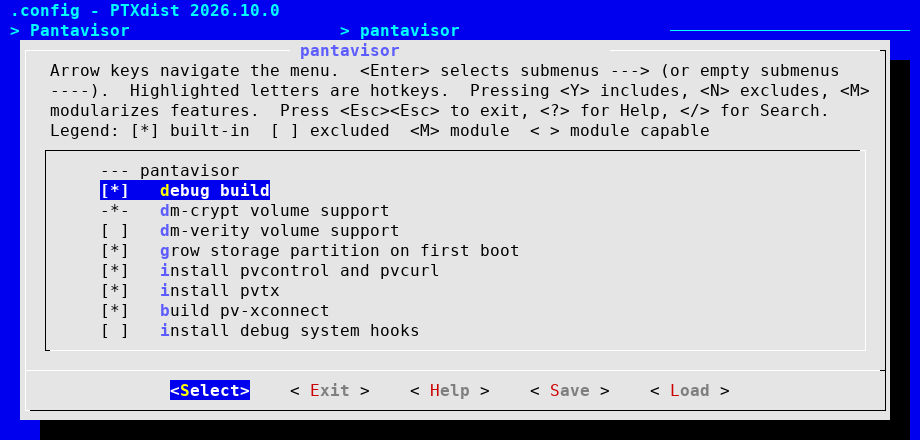
scripts/pv-docker.sh ptxdist menuconfig            # Pantavisor > pantavisor, Pantavisor > containers in revision 0
The board for a platform, and the settings all boards share:
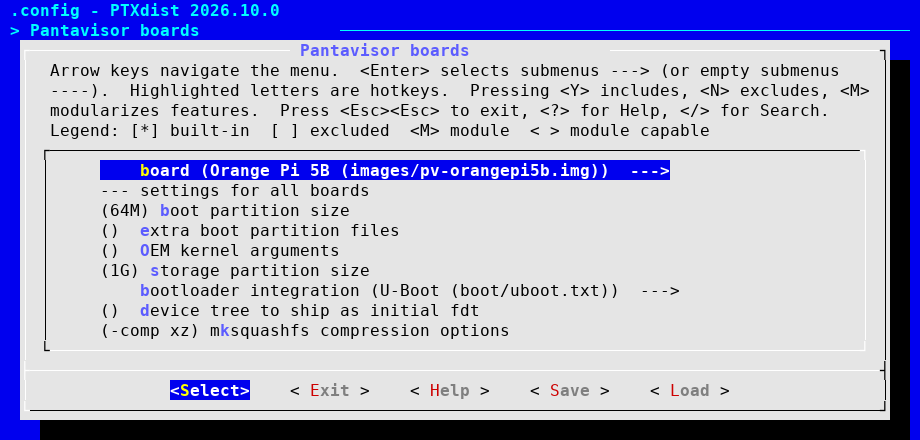
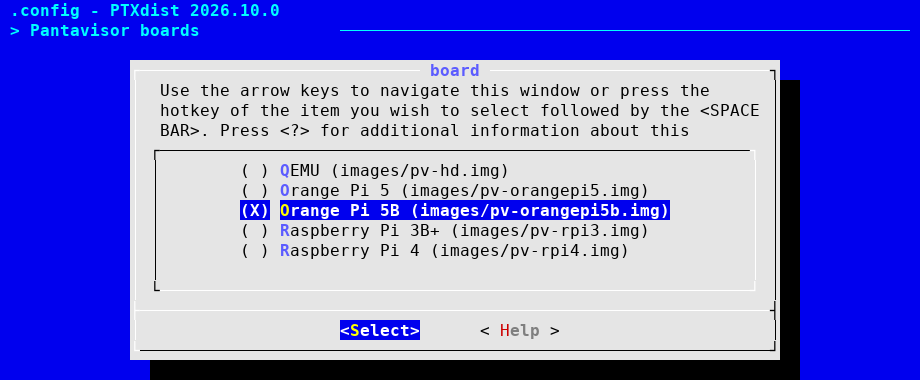
The Pantavisor build options, such as a debug build, dm-crypt and dm-verity volumes, growing the storage partition on first boot, and the pvcontrol, pvtx and pv-xconnect tools:
The containers that go into revision 0. Pick the prebuilt ones, or add your own .pvrexport.tgz files under “more container pvrexports”:
The Pantavisor packages live in rules/ and the image types in platforms/, if you want to look at how it fits into PTXdist.
Feedback welcome here, or as issues on GitHub.